Better xCloud Wiki download & setup guide
English
Menu
DOWNLOAD CENTER / SETUP HUB

Better xCloud Download and Install Guide

Choose your device, download Better xCloud from a verified official source, and get a practical setup path for Xbox Cloud Gaming. This independent guide separates the PC userscript, Android APK and platform-specific installation methods so you do not download the wrong package.

Install Better xCloud for PC Official userscript · v6.7.12
Download Better xCloud APK Official Android APK · v0.24.2
Install on iPhone / iPad Safari userscript installation guide
Source check: August 14, 2026 Official source links only
Source note: Betterxcloud.wiki is an independent guide. Better xCloud is a separate community project and is not affiliated with Microsoft, Xbox or the Better xCloud developers.
01 / PLATFORM SELECTOR

Choose the Better xCloud install path for your device

The platform changes the package, permissions and supported input methods. Start here before you download anything.

Userscript v6.7.1201

PC

Windows, macOS, Linux & SteamOS

Use the Better xCloud userscript in a supported Chromium browser. This is the best starting point when you want stream controls, server selection, resolution options or keyboard and mouse support.

Open the PC install guide
APK v0.24.202

Android

Android phones, tablets & TV

Install the separate Better xCloud Android app when you want a packaged client, Android TV support or a living-room setup. The APK is linked from the official Android repository release.

Open the Android guide
Safari / iPadOS03

iPhone & iPad

Safari userscript route

iOS and iPadOS use a Safari userscript workflow rather than the Android APK. Follow the device-specific guide for the required userscript app, permissions and first launch.

Open the iOS guide
Platform-specific04

TV platforms

Android TV & LG webOS

TV installation depends on the platform. Android TV follows the Android app route, while LG webOS uses its own browser or webOS instructions. Do not assume a PC userscript can be installed directly on every TV.

See TV installation paths
VERSION CHECK

Use the package that matches your device

Better xCloud does not have one universal download. The PC version is a browser userscript, while the Android version is a separate app release. Keeping those versions separate prevents a common installation mistake: trying to install an APK in a desktop browser or treating a userscript like a normal app.

PC userscript v6.7.12 Official GitHub Release · July 14, 2026
Android app v0.24.2 Official GitHub Release · October 24, 2025
Verification Official assets Checked August 14, 2026
REAL PRODUCT REFERENCE

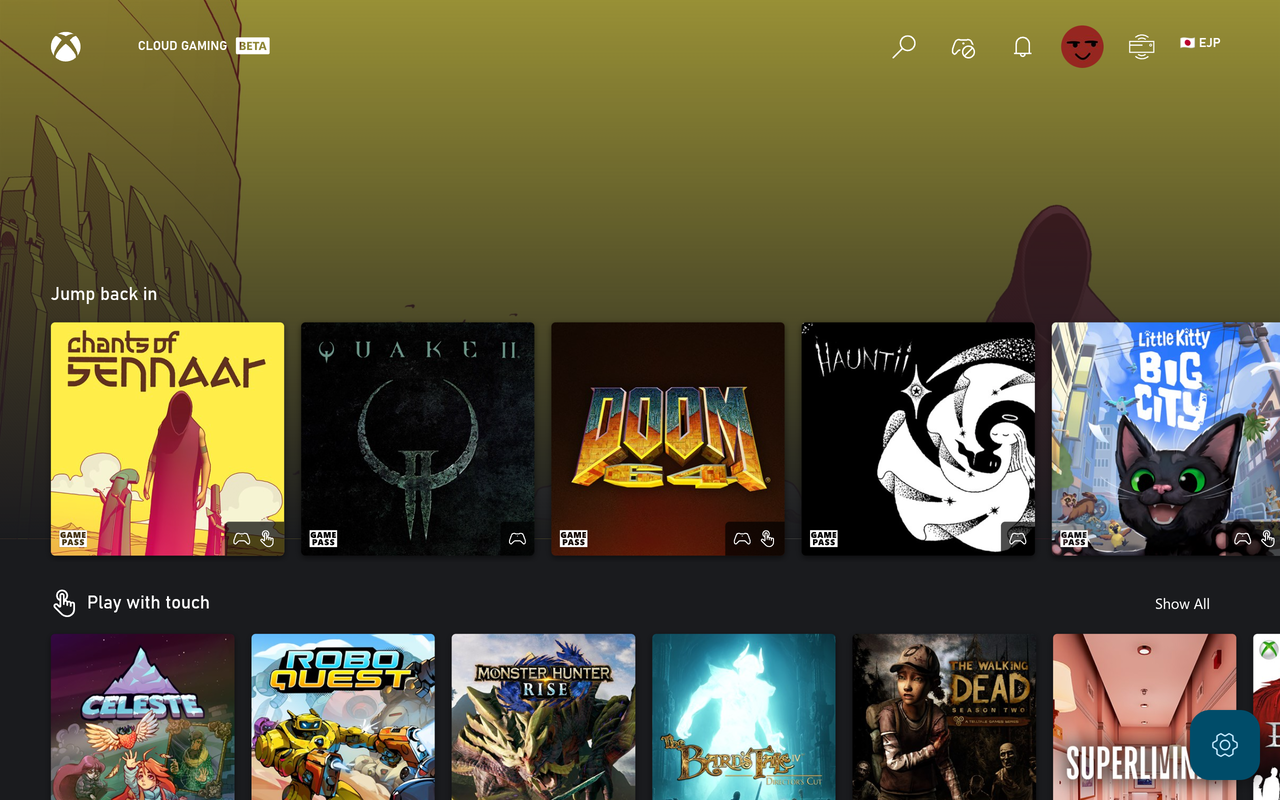
See the Android client before you install it

A real upstream screenshot helps you distinguish the Android app route from the PC userscript. It is shown for orientation, not as a replacement for the official release notes.

Open the official Android guide
Official Better xCloud Android app home screen screenshot
Official upstream Android app screenshot. The image is shown as a product reference; download links still point to the official release repository.
02 / WHY THIS HUB

One Better xCloud guide for download, setup and support

Better xCloud is easier to use when the source, platform and troubleshooting path stay connected.

01 / CHOOSE

Start with the correct client

The download center makes the first decision obvious: PC userscript, Android APK, iOS Safari workflow or TV-specific instructions. That prevents incompatible downloads and reduces trial-and-error during setup.

02 / CONFIGURE

Tune the stream instead of guessing

Use the settings guide to understand server selection, stream resolution, bitrate, image format and decoding performance. The goal is a stable stream for your network, not a magic setting that works for everyone.

03 / FIX

Diagnose the failure state

When Better xCloud stops appearing, games no longer launch or a controller disappears, the troubleshooting pages follow the error state. Check the extension or userscript environment before changing network settings at random.

A CLEAN FIRST SETUP

How to use Better xCloud without mixing up the steps

01

Pick a platform

Choose PC, Android, iOS/iPadOS or TV first. The platform determines the installation method and the kind of controller or browser support you can use.

02

Use an official source

For PC and Android, the primary Better xCloud download buttons on this site point to official GitHub Release assets verified during the source check. Release pages are also linked when you want to inspect notes yourself.

03

Open Xbox Cloud Gaming

After installation, sign in through the normal Xbox Cloud Gaming flow. Better xCloud changes the client experience; it does not replace your Microsoft account or Game Pass access.

04

Apply one setting at a time

Start with the default stream profile, then change resolution, bitrate, server or input settings one at a time. This makes it easier to identify which change helped or caused an error.

QUICK SUPPORT PATHS

Find the guide that matches your next problem

Better xCloud is not working

Check whether the userscript or extension is running, whether Developer Mode is enabled where required, and whether the page is using a stale cached script.

Troubleshoot Better xCloud

Keyboard and mouse

Learn when native browser input, Better xCloud's keyboard and mouse feature or a virtual controller is the right path for a specific game.

Set up keyboard & mouse

Controller problems

Use the controller guide for browser permissions, USB/Bluetooth checks, virtual controller conflicts and games that do not detect your pad.

Fix controller detection

Local co-op

Local co-op needs more than two controllers. Follow the supported browser and input arrangement before inviting a second player into the same stream.

Configure local co-op
01 / GUIDE NOTES

What is Better xCloud?

Better xCloud is a community-made client enhancement for Xbox Cloud Gaming. Depending on the platform, it can add a userscript, browser-based client layer or Android application with extra controls around the cloud gaming session. The exact feature set depends on the client and device, so this site treats Better xCloud as a platform-specific installation rather than a single universal app.

People usually search for Better xCloud when the standard Xbox Cloud Gaming experience does not expose enough control over the stream, input method or client interface. Common goals include choosing a better server route, testing a higher resolution, adjusting bitrate, using a keyboard and mouse, running local co-op or understanding why a game no longer launches. The guides here are organized around those decisions, not around a single download link. For a Better xCloud download, start by matching the client to your device before changing any stream setting.

02 / GUIDE NOTES

Better xCloud download and install source policy

The safest download path is the official Better xCloud project repository or its official documentation. This site does not repackage the Android APK, mirror the PC userscript or claim that an independent badge makes a file safe. The PC and Android buttons use the official GitHub asset URLs that were checked for release metadata, response type and file signature on August 14, 2026.

You should still review release notes, verify that the platform matches your device and keep your browser or Android system updated. An official source proves provenance; it does not guarantee that every network, browser extension, controller or security product will behave identically on your machine. If a direct asset is unavailable, use the official release page rather than a random mirror.

03 / GUIDE NOTES

Better xCloud settings for image quality and latency

There is no single best Better xCloud setting for every connection. Higher resolution and bitrate can improve detail, but they also increase bandwidth demand and may expose Wi-Fi interference or decoding limits. A stable 1080p stream with consistent frame delivery is often more useful than a fluctuating higher-resolution profile. Use the settings guide to change one variable at a time and watch the stream statistics after each change.

Server selection can also affect the result. A nearby server is not automatically the fastest route if your ISP takes a congested path, and a low ping value does not remove packet loss or jitter. Record the before-and-after behavior, then keep the profile that produces the smoothest gameplay for your location. Better xCloud can expose more controls, but it cannot fix a weak Wi-Fi signal or an overloaded home network by itself.

FAQ / QUICK ANSWERS

Better xCloud questions, answered clearly

These answers cover the download, platform, settings and support questions that usually appear before or after installation.

What is the official Better xCloud download for PC?

The PC version is a userscript. This site links to the official better-xcloud.user.js asset from the Better xCloud GitHub Release and labels the verified version separately from the Android app.

Where can I download the Better xCloud APK?

Use the official Android repository release. The Android page on this site links to the verified APK asset and also provides the official release page so you can review the package and notes.

Is Better xCloud available on iPhone or iPad?

There is a Safari userscript installation path for iOS and iPadOS. It is different from the Android APK, so follow the iOS guide and use the official upstream documentation linked there.

Can Better xCloud improve graphics?

It can expose stream options such as resolution, bitrate or image format where the client supports them. Results still depend on Xbox Cloud Gaming availability, your network, display and device decoding performance.

Why does Better xCloud stop working after I change a setting?

A changed setting can reveal a userscript error, stale browser cache, extension conflict or unsupported client state. Revert the last change, reload the page and use the not-working guide to isolate the failing layer.

Can I use keyboard and mouse with Better xCloud?

Keyboard and mouse support depends on the browser, client mode and game. The keyboard and mouse guide explains the difference between native input, Better xCloud input features and virtual-controller workarounds.

Does Better xCloud support two-player local co-op?

Some local co-op scenarios are supported, but input routing and game compatibility matter. Use the local co-op page before connecting a second controller and check the official upstream notes for current limitations.

Is Betterxcloud.wiki the official Better xCloud website?

No. Betterxcloud.wiki is an independent English download and setup guide. Official source links are provided so visitors can compare instructions and obtain packages from the upstream project.